What I built and why
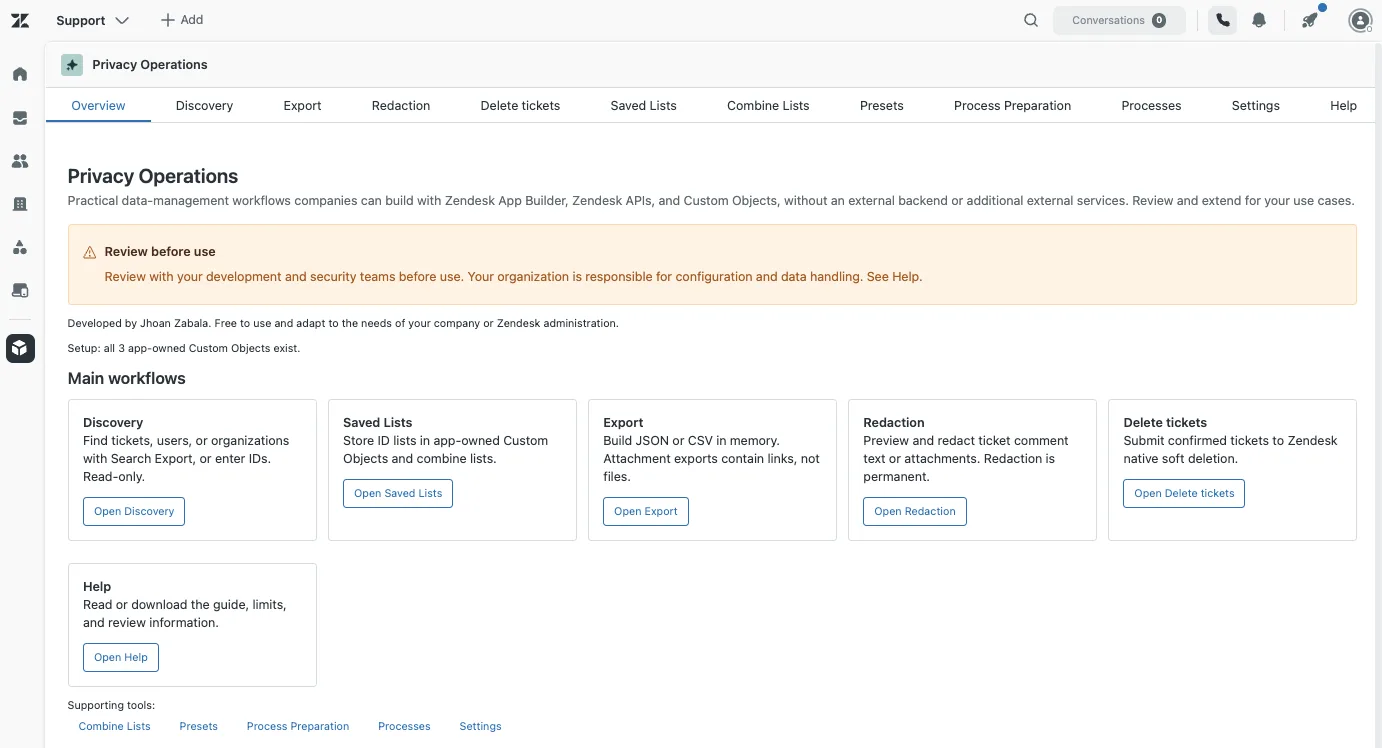
I built Privacy Operations: an app for administrators that lets you search records, organize lists, export information, redact content and delete selected tickets. I developed it with Zendesk App Builder, the Zendesk APIs and Custom Objects, without deploying an external backend.
I wanted two things: to offer a free-to-use base that other administrators and companies can adapt without paying an extra subscription for a third-party app, and to test the real reach of App Builder with a case that included reading, storage, export and operations on tickets.
The problem it solves
The app brings together several tasks an administrator may need when reviewing the information stored in their instance:
- Find tickets, users or organizations through filters or IDs.
- Save selections of IDs and combine lists.
- Export records and comments to JSON or CSV.
- Create an attachment index with its links.
- Redact an exact text or selected attachments inside comments.
- Delete tickets through Zendesk’s native process.
An example: an administrator identifies a group of tickets, reviews the selection and exports the information they need to keep. Afterwards they can redact a specific piece of data or delete disposable tickets, always through a preview and an explicit confirmation.
The app doesn’t decide what information a company should keep, what data should be deleted or what its retention policy is. Those decisions belong to the organization.
The architecture: what stays inside Zendesk
The interface runs as a side navigation app, in the nav_bar location. It uses React, Zendesk Garden components and the Zendesk Apps Framework (ZAF) to work with the administrator’s session.
The APIs query and modify the authorized resources. Custom Objects store lists, presets and part of the process infrastructure. Previews, exports and the results of the main operations stay in the browser’s memory.
Scroll horizontally to see the whole diagram.
Keep in mind: storing a process is not the same as running it in the background. Custom Objects are not a scheduler and browser memory is not a persistent queue.
In this MVP, Export, Redaction and Delete tickets don’t save their runs in the jobs and checkpoints objects. If you reload, you lose the state of those sessions. A native deletion job that was already submitted to Zendesk may continue even if you close the app.
What each tab does
| Tab | What it’s for |
|---|---|
| Overview | Presents the app’s purpose and access to its main workflows. Summarizes the conditions worth knowing before you start. |
| Discovery | Searches tickets, users or organizations with filters, queries and IDs; it also accepts ID input by CSV. Lets you review and select results for the following operations. |
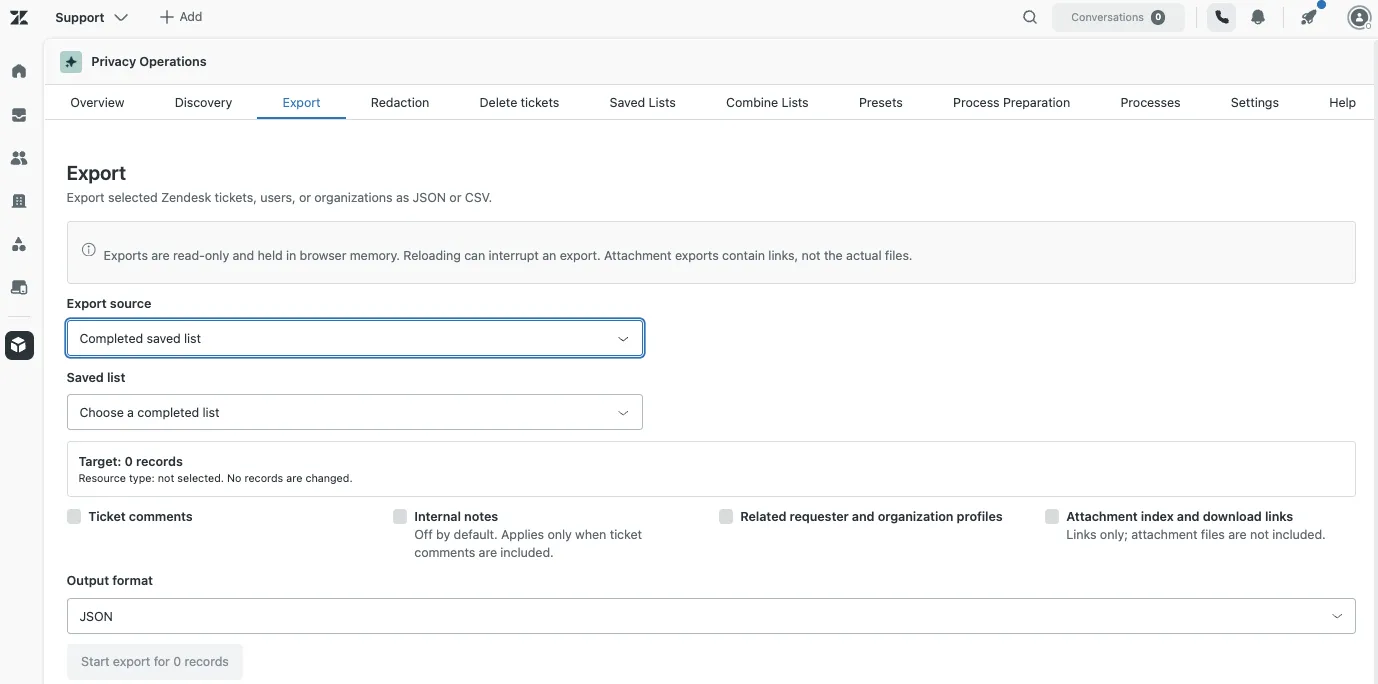
| Export | Generates JSON or CSV tables with the records and the options chosen. Attachments are included as an index and links, not as embedded files. |
| Redaction | Searches for an exact text or shows comment attachments so you can select what to redact. Lets you review the scope before confirming an irreversible operation. |
| Delete tickets | Prepares and runs the initial deletion of selected tickets in batches. Shows the status of the native jobs and per-ticket results when they can be determined. |
| Saved Lists | Saves sets of IDs for reuse. Lists stay in Custom Objects; an ID can still be information linkable to a person. |
| Combine Lists | Calculates union, intersection or difference between compatible lists. Lets you keep the result as a new list of IDs. |
| Presets | Saves reusable options for preparing a selection. A preset doesn’t run an export, redaction or deletion by itself. |
| Process Preparation | Prepares a selection from a list and a preset, applying exclusions. It’s a preparation step: it doesn’t run the actions of the other tabs. |
| Processes | Shows jobs and checkpoints stored by the process infrastructure and the diagnostics. In this MVP it is not a persistent history of all exports, redactions or deletions. |
| Settings | Checks and configures the app’s own objects, runs diagnostics and lets you clear their finished history. Includes the access, storage and execution details. |
| Help | Brings together the usage guide, limits, tests and development notes. Lets you copy or download the documentation as Markdown. |
How I built it: one app, several phases and tests between versions
I didn’t try to generate the whole app in a single response. I split the build into stages and kept the same App Builder conversation going to continue on top of the existing version.
The pattern was:
Some iterations needed correction: features described as finished that weren’t verified, filters classified incorrectly and simultaneous changes to the same file that overwrote other changes. The fix was to ask for readings of the real state, apply dependent changes sequentially and demand evidence before calling a stage validated.
The blocks below consolidate the main prompts and the corrections we used. They are adapted to the final scope of the MVP and remove instance data. They are not a literal transcript of every message and they don’t guarantee an identical regeneration: App Builder can produce different code, component names and versions.
Copy one block at a time. Each phase should stop so you can review its result.
Phase 1. Foundation, access and configuration
First we built the structure and the app’s own objects. At this stage, writes had to be limited to those objects, without altering tickets, users or organizations.
See prompt 1: structure and foundation of the app
Create a Zendesk app called “Privacy Operations”, located in Side Navigation (nav_bar), for administrators.

Use React, Zendesk Garden, ZAF and documented Zendesk APIs. Work with the administrator's authenticated session, without asking for tokens. Do not use an external backend, additional paid services, external databases, telemetry or external processing of information.

This is phase 1. Implement the foundation only.

ACCESS
Check the user through ZAF and GET /api/v2/users/me.json. Require the admin role and a matching identity. On errors, block access. Revalidate before writes and execution actions.

Explain how to restrict the app to administrators in the installation settings. Do not confuse app visibility with permissions over records.

CUSTOM OBJECTS
Use the current Custom Objects APIs. Check quotas and schemas before creating anything.

Define these versioned objects:
- privacy_ops_definitions: lists and presets.
- privacy_ops_jobs: job state, execution owner and heartbeat.
- privacy_ops_items: items of each job, stages and checkpoints.

Initial fields:
- Definitions: kind (text), schema_version (integer), definition_json (multiline text).
- Jobs: operation, status, actor_id, executor_token, heartbeat_at, started_at and finished_at (text); schema_version (integer); config_json and counters_json (multiline text).
- Items: job_id, resource_type, resource_id, stage, status and submitted_job_id (text); attempts (integer); result_json (multiline text).

Verify types and properties against the current documentation. Use stable names and external identifiers. Keep each record under 24 KB and respect the limits of its fields as well. Split large state into bounded records.

Create an explicit, idempotent setup. Do not modify objects that are not yours. If an existing field has an incompatible type, report the problem and stop.

Review the configurable permissions, anonymous access and uniqueness of identifiers. Do not claim administrator-only access without checking the effective permissions. If a role has predefined permissions that cannot be modified, report the limitation.

STORAGE
Store only what is necessary: IDs, options, timestamps, counters, checkpoints and sanitized errors. Do not store original comments, exported files, attachment URLs, tokens or sensitive search terms.

INFRASTRUCTURE
Create a shared adapter for API calls, pagination, Retry-After and errors. At the start, allow writing only to the three app-owned objects.

Implement job states: draft, preparing, ready, running, paused, interrupted, awaiting_review, completed, completed_with_errors and cancelled.

A heartbeat is a best-effort check, not an atomic lock. Do not automatically resume old jobs or retry writes with an uncertain result.

SCREENS
Create Overview, Saved Lists, Presets, Processes and Settings. Implement ID lists and presets with read, create, edit and delete on the app-owned objects.

Include read-only checks and a diagnostic with disposable synthetic records. Clean up only the records created by that diagnostic.

Build and report what you implemented, what you actually tested and what remains pending. Do not alter customer data. Stop before phase 2.
The first lesson was about access: an administrator check in the interface doesn’t prove that other roles lack direct access to the Custom Objects. That evaluation requires tests with real identities and the account’s permissions.
Phase 2. Searches, lists and preparation
Next we added Discovery and selection preparation. The goal was to avoid operating on a set that silently changed between the search and the execution.
See prompt 2: complete search, lists and previews
Continue on Privacy Operations and keep the previous phase. Implement only Discovery, list combination and selection preparation.

DISCOVERY
Support tickets, users and organizations through:
- IDs entered manually.
- CSV of IDs with a chosen resource type.
- Native searches with documented filters.

Deduplicate IDs and distinguish invalid, inaccessible, not found and wrong-type entries when the information allows it. A lone numeric ID does not by itself identify the resource type.

Load the real field metadata. Present filters appropriate to each resource and show the generated query.

Use Export Search Results with cursor pagination to enumerate results:
GET /api/v2/search/export
Send filter[type] as a separate parameter, using ticket, user or organization. Do not add type: inside the query of that endpoint.

Follow the pages to the end. Show progress, unique IDs, duplicates, pages, date and completeness status. Distinguish complete, partial, interrupted and failed results.

Configure an internal Discovery limit of 20,000 IDs, reporting it and marking the result as partial if it is reached before the end. For ID input use a maximum of 3,000. Do not present the standard search limit of 1,000 results as a complete set.

Do not claim that a simulation evaluates real queries if it returns fixed results.

LISTS
Keep compatibility with existing lists and store IDs and minimal source metadata, without query text or record content.

Implement union, intersection and A minus B difference between complete lists of the same type. Block incomplete, incompatible lists or lists with missing fragments. Design lists for up to 3,000 IDs and respect the storage size limits.

PREPARATION
Allow choosing a list and a preset, applying exclusions by ID or tags, and reviewing reconciled counts and the selected IDs.

Preparation does not run exports or actions on tickets. Keep the selection fixed in memory and invalidate it if the source, options or exclusions change.

Keep the persistence of frozen selections of real targets blocked while the access evaluation is pending. Do not claim that this block automatically applies to Saved Lists: verify and explain each path separately.

TESTS
Check the set operations with overlapping synthetic data.
Add a pagination test that creates seven disposable records, retrieves them across several pages and deletes them.
Offer an explicit reload-and-recovery test, without confusing an uninterrupted run with a real recovery.

Do not enable export or writes on tickets, users or organizations. Build, present real, simulated and pending evidence, and stop.
An important adjustment was separating “it isn’t implemented” from “Zendesk doesn’t allow it”. In the first metadata table, fields that did have documented syntax appeared as unsupported.
See adjustment: classification of fields and queries
Make a targeted fix to the Discovery metadata and filters. Keep the pagination and set operations that already work.

Distinguish native fields, custom fields, special standard:: fields and unclassified ones using the documented properties. Do not classify all numeric IDs as custom fields.

Consult the official references:
https://support.zendesk.com/hc/en-us/articles/4408882086298-Search-reference-for-tickets
https://developer.zendesk.com/api-reference/ticketing/ticket-management/search/

Implement priority, group, tags and applicable custom field searches. Use real values and labels. Respect the differences between types and operators; do not generate a universal syntax for all of them.

Keep filter[type] out of the export query.

Show correct states: supported, not supported with a documented reason, or not yet implemented. Do not turn a pending feature into a supposed Zendesk limitation.

Inspect the save handlers: document exactly which paths write lists and which block frozen selections.

Apply changes that depend on the same file sequentially. Read the final content, check that the components are wired up in App.jsx, build and report what you have not tested.
Phase 3. Export with an explicit scope
The export had to do something simple and verifiable: read the chosen targets, apply the options and produce downloadable files.
We decided to keep attachments as an index and links. It’s not a ZIP or a copy of the files. The binary limitation of client.request was one reason to narrow that flow without adding external services.
See prompt 3: JSON and CSV export
Continue Privacy Operations with an MVP export flow. Keep what exists and add an Export tab wired up in App.jsx.

SOURCES
Support a complete saved list, selected Discovery results, or all results of a complete search. Reject partial sources. Show the exact type and quantity before starting.

OPTIONS
Include independent checkboxes, off by default:
- Ticket comments.
- Internal notes.
- Related requester and organization profiles.
- Attachment index and links.

When internal notes are off, both the exported comments and the attachment index must be limited to public comments.

For users and organizations, export the selected profiles. Do not automatically expand to their related tickets.

FILES
Generate JSON and CSV tables of records, comments, related profiles, attachments and errors, as applicable. Keep relationship IDs, authorship, date, order and visibility.

Use UTF-8, CSV escaping and protection against spreadsheet formulas. Serialize custom fields without losing their keys or IDs.

ATTACHMENTS
The option must be called “Attachment index and download links”.
Export ticket ID, comment ID, attachment ID, name, MIME type, size, inline flag and content_url.

Get inline images through the documented option when listing comments. Offer individual links through the normal Zendesk flow.

Explain that the files are not embedded, may require authentication and their links may stop working after a redaction or deletion. Do not implement ZIP, binary download with client.request, external proxies or URL extraction from text.

EXECUTION
Paginate all comments and process requests with limited concurrency. Respect Retry-After. Show progress, successes and failures. Cancel stops new requests.

Keep the data already retrieved if another record fails and generate an error manifest. Mark a cancellation or partial recovery as incomplete.

Split the output into parts of up to 200 targets and handle memory errors without silent truncation. That limit does not guarantee a maximum size in bytes.

Keep files, content and URLs in memory only. Do not use Custom Objects or browser storage for those payloads. Do not depend on the persistence of frozen selections.

Reloading interrupts the export and requires restarting it. Do not promise persistent resumption.

TESTS
Prepare synthetic cases with more than one page of comments, an internal note and attachments.
Check small exports, options, errors and cancellation when the environment allows it. Label simulated and real results separately.

Do not enable modifications of tickets, users or organizations. Build, report the limitations and stop.
Phase 4. Redacting text and attachments
Here we moved from querying information to modifying content. That’s why we added previews, confirmations and an authorization limited to the chosen comments.
See prompt 4: native redaction with confirmation
Continue Privacy Operations with a Redaction tab wired up in App.jsx.

MVP SCOPE
Allow entering a ticket ID or using selected tickets from a complete Discovery. Limit each preview to 50 tickets and the searched text to 500 characters.

Offer two independent actions:
1. Redact an exact text given by the administrator.
2. Redact explicitly selected attachments.

Do not implement automatic detection of personal data, anonymization of profiles, ticket deletion or scheduled execution.

PREVIEW
Load all comment pages with inline attachment metadata. By default review public comments; internal notes require opt-in.

For text, use literal, case-sensitive matching. Show ticket/comment IDs, matches and escaped before/after previews. Allow excluding comments.

For attachments, show IDs, name, size and inline status. Do not select files automatically.

REDACT
Use PUT /api/v2/comment_redactions/{comment_id} with ticket_id.
For text, send the existing html_body with precise <redact> marks.
For attachments, send external_attachment_urls only for the files selected from that comment.

Work on DOM text nodes. Do not replace strings over unparsed HTML. Keep the rest of the content. In this MVP, skip matches that span nodes or sit in unsupported elements and explain those cases.

Report unsupported comments/channels or ones without a usable html_body. Do not use a normal ticket update, or deleting and recreating the comment, as an alternative.

CONFIRMATION
Require reviewing the preview, accepting irreversibility and typing REDACT.
Changing inputs invalidates the preview and the confirmation. Changing exclusions or files invalidates the confirmation.

Before executing, revalidate the administrator and re-read the comments. If the content, visibility or attachments changed, require a new preview.

Process one comment at a time. Respect Retry-After. Do not blindly retry an uncertain write. Cancel only stops new operations.

Extend the write guard only to the endpoint and the confirmed ticket/comment pairs. Keep the other data modifications blocked.

Re-read to verify results and distinguish verified, failed, skipped and uncertain. Allow downloading a sanitized report of IDs and results.

Keep the original content and the terms in memory. Do not add persistence or promise resumption after a reload. Warn that the operation can trigger existing rules in the account.

VALIDATION
Include synthetic tests for repetitions, case sensitivity, HTML, matches across nodes, internal notes, attachment scope, exclusions, errors, cancellation and write guard.

Do not run real redactions during development. Real tests must be started manually on disposable content through the confirmation flow.

Build, report the evidence and stop before phase 5.
For the controlled test we used a fictitious phrase repeated in a comment and disposable files. We reviewed both the selection beforehand and the re-read afterwards that the operation reported.
Phase 5. Initial ticket deletion
The last functional module uses native batch deletion. The MVP doesn’t implement permanent deletion, deleting users or organizations, or cascades over related records.
An accepted request is not yet a completed deletion. The flow must query the native job and distinguish successful, failed, pending and uncertain results.
See prompt 5: basic batch deletion
Continue Privacy Operations with a Delete tickets tab wired up in App.jsx. Keep the existing flows and controls.

Implement only initial ticket deletion through Zendesk. Do not add permanent deletion, restore, users, organizations, cascades or scheduling.

SOURCES AND PREVIEW
Support manual IDs, selected tickets from a complete Discovery, or a complete list of tickets. Limit to 1,000 tickets per session.

Deduplicate and read the current data. Show ID, subject, status and updated_at in a paginated preview kept in memory.

Distinguish eligible, not eligible, already deleted, inaccessible, unavailable and errors when there is evidence. An unexplained 404 does not confirm deletion.

Respect native restrictions, including those for unresolved or closed AI Agent tickets. Do not change statuses to make them eligible.

Allow exclusions. Fix the eligible IDs and invalidate the confirmation if the selection changes.

CONFIRMATION
Require reviewing the selection, accepting the deletion lifecycle and typing DELETE N TICKETS with the exact quantity.

Explain Zendesk's native lifecycle, its recovery limits and that this app does not restore or permanently delete. Offer access to Export and clarify that a link index is not a copy of the attachments.

EXECUTION
Use DELETE /api/v2/tickets/destroy_many?ids={ids}.
Send up to 100 IDs per request. Process one batch and wait for its result before sending the next.

Capture job_status and query the status endpoint until it finishes. Use the real structure of the results; do not invent individual successes.

Revalidate the administrator before executing and before each batch. Re-read the tickets. Skip targets that changed since the preview and ask for review.

Extend the guard only for DELETE to that route, with no external host, no body and no additional parameters, and with the confirmed IDs. Keep the earlier permissions for redaction and app-owned objects. Block the permanent deletion routes.

ERRORS AND RESULTS
Respect limits and Retry-After. An uncertain network or server response must not cause an automatic resend.

Cancel stops new batches; those already sent may continue in Zendesk. If a job is still running when the wait times out, keep its tickets pending and stop the following batches.

If the result is ambiguous, use documented read checks. Do not interpret absence from a listing as proof of deletion.

Show reconciled quantities: selected, excluded, skipped, sent, pending, successes, failures and uncertain. Export JSON/CSV with IDs, jobs, dates and codes, without original content.

Keep the state in memory. Explain that reloading loses it and that submitted jobs may continue. Do not promise rollback or persistent resumption.

Include synthetic tests for inputs, exclusions, confirmations, batches, jobs, restrictions, retries, cancellation, target changes, reports and guard.

Do not delete real tickets automatically during development. Build, report what was tested and stop before the wrap-up.
Phase 6. Documentation, free use and delivery
The last phase organizes the experience and leaves instructions so another person can review and extend the work.
See prompt 6: wrap-up, attribution and documentation
Finalize the presentation and documentation of Privacy Operations. Do not add modules or rewrite logic that works.

Use “Privacy Operations” as the name and add:
“Developed by Jhoan Zabala. Free to use so companies and administrators can adapt it to their needs”.

Do not invent a license or additional terms.

Briefly explain in Overview that the app demonstrates practical workflows and the reach of Zendesk App Builder, the Zendesk APIs and Custom Objects without an external backend.

Simplify the texts of the tabs. Leave action instructions and immediate limits. Move long explanations to Help or collapsible sections of Settings. Keep the confirmations and warnings needed when redacting or deleting.

Add Help with the option to copy and download Markdown:
- Real features and requirements.
- Setup of the three app-owned objects.
- Guide to each flow.
- Data in memory versus stored data.
- Limits taken from the code, distinguishing internal ones from Zendesk's.
- Pending evaluation of access for other roles.
- Tests actually observed and pending.
- Module map, schema, allowed write paths and extension points.
- An ordered rebuild recipe, without guaranteeing identical results.

EVIDENCE LOG
Mark as evidence provided, not as tests run by this version:
- Setup and real pagination of app-owned objects.
- 14 set checks.
- One controlled search with a matching count.
- JSON export of three tickets and another with six public comments.
- 14 synthetic redaction checks.
- Redaction of text and three attachments spread across two test comments.
- 19 synthetic deletion checks.
- Initial deletion of one disposable ticket with a completed job, one success and no uncertain results.

Do not include IDs, names, instance domains, payloads or real data.
Do not claim CSV, an exported attachment index, large volumes, real recovery after reload or access by other roles as tested if there is no evidence.

RESPONSIBILITY
Include in Help that the app is an adaptable base. The company must review the code, permissions and data with its development and security teams before using it. The administrator and the organization are responsible for its configuration, modifications and handling of information. Jhoan Zabala does not accept responsibility for misuse or improper handling of information through the app.

Do not present the notice as a legal guarantee or certification.

CONTACT
Email: jzabalacx@gmail.com
Web: https://www.jhoanzabala.com
LinkedIn: https://www.linkedin.com/in/jhoanzabala/

Check texts, navigation and the downloadable guide. Build. Report what you actually verified, without running real modifications or publishing automatically.
The control prompt we used between phases
When App Builder’s response described more than we could verify, we went back and asked for a review of the code and the evidence.
See review prompt: confirm what was built before continuing
Before moving forward, inspect the current code and compare it against the requirements of this phase.

Confirm that the files exist, contain the expected version and are connected to the navigation. Apply changes that depend on the same file sequentially to avoid overwrites.

If something is missing, complete only that part and keep what works. Do not present a missing feature as a Zendesk limitation without verifying it.

Return a table with requirement, location in the UI, status, evidence and pending action.

Distinguish:
- Build.
- Synthetic test run.
- Real test run.
- Code inspection.
- Pending test.

Do not say a test passed if you did not run it. Do not confuse creating a version with verified operation. Do not use real data during automated modification tests.

Build and stop at the end of the phase. Wait for validation before the next one.
How to develop it and install it in your account
I recommend starting in a sandbox or with controlled test cases. The Test button uses real data from the selected environment: it doesn’t turn a destructive operation into a simulation by itself.
- Check the requirements. You need administrator access, App Builder, Custom Objects, enough quotas and the capabilities the APIs use. For redaction, review Agent Workspace and the corresponding permissions.
- Open Admin Center → Apps and integrations → Apps → App Builder. Start a conversation and select Side Navigation, which corresponds to
nav_bar. - Send the phase 1 prompt. Review the proposed plan, the code and the interface before continuing.
- Run the Settings checks. Review permissions and schema before the setup. Then configure the app’s own objects and use synthetic records for the diagnostics.
- Continue with the prompts in order, in the same conversation. Use the control prompt when you have doubts or differences between the report and what you observe.
- Test each phase and keep useful versions. Tell Preview mocks apart from Test runs. Check the exported file, the redacted content and the result of the deletion job, as applicable.
- Do the company review. Development and security should evaluate effective permissions, data handling and write paths before using operational information.
- Publish only when you decide to enable it. In App Builder, Publish lets you configure roles or groups and complete the installation in that account. Restrict this app to administrators.
- Verify the installation with a small test. Check navigation, access and permitted operations in the environment where it will actually be used.
Don’t assume the sandbox app carries over to production automatically. The current App Builder documentation indicates that a build is tied to an environment and must be recreated in another one when needed. Keep the prompts and record the adjustments specific to each account.
What we managed to verify
For this base we ran small, controlled tests. The goal was to verify specific paths, without presenting the result as a load test or a full security assessment.
| Area | Evidence available |
|---|---|
| Setup and pagination | Creation of the app’s own objects and retrieval of seven synthetic records across three pages, followed by cleanup. |
| List operations | 14 in-memory checks of union, intersection, difference and compatibility validations. |
| Discovery | A query connected to Zendesk with matching results and count on a small sample. |
| Export | Valid JSON of three tickets; a second export included six public comments. |
| Redaction | 14 synthetic checks and a controlled text test, plus three attachments spread across two comments. |
| Deletion | 19 synthetic checks and one disposable ticket deleted with the native job completed and a successful result. |
Still pending: tests with large volumes, effective access by other roles, real recovery after a reload, CSV output contents and an exported index with real attachments. We also didn’t verify every redaction channel and case, nor a real deletion with several batches.
Limits of this version
These are limits of the MVP I built, not a list of general Zendesk limits.
| Area | Limit or behavior of this base |
|---|---|
| Discovery | Up to 20,000 IDs; if it stops before the end, the result must be shown as partial. |
| Input and lists | Input of up to 3,000 IDs; lists and selections designed for that size. Field and record limits still apply. |
| Redaction | Up to 50 tickets per preview and search text of up to 500 characters. Literal, case-sensitive matching; some HTML cases and content types are skipped. |
| Deletion | Up to 1,000 tickets per session and 100 per request. Initial ticket deletion only; native restrictions still apply. |
| Export | Limited by browser memory. It’s split by number of targets, which doesn’t guarantee a maximum file size. |
| Exported attachments | An index with links is generated; the files are not embedded in the export. |
| Operational persistence | Exports, previews and main results stay in memory and are lost on reload. |
| Background processes | The app doesn’t schedule tasks or guarantee continuity with the browser closed. Native jobs already submitted may continue. |
| Permissions | Access by other roles to the app’s own objects requires an account-specific evaluation. UI visibility doesn’t prove data isolation. |
Also, a redaction is irreversible and can generate updates that trigger existing rules. It doesn’t automatically redact external copies of the same content. Ticket deletion follows Zendesk’s native lifecycle, with its recovery rules and later permanent deletion.
In this base, Process Preparation prepares selections and Processes keeps diagnostic infrastructure; they should not be read as persistent orchestration of all actions. Saving lists and persisting a frozen selection are different paths and should be reviewed separately.
How a company could extend it
The MVP’s limit helps decide what to build next. If the need is a manual action with a controlled volume, the app can be a useful base inside Zendesk. If you need continuous execution, large files or coordination among several administrators, the architecture should change.
An extension with its own backend could add:
- Persistent work queue: execution and resumption independent of the browser.
- Scheduler: tasks scheduled according to approved retention policies.
- File processing: authorized download of attachments, packaging and exports by real size.
- Coordination across sessions: concurrency control and prevention of simultaneous runs.
- Protected traceability: persistent history with defined permissions and retention.
- Additional controls: approvals per operation, policy-based exclusions and validations specific to each business.
That backend would have its own costs and responsibilities. You would need to define authentication, credential management, minimum permissions, storage, retention and deletion of the generated files. Adding infrastructure doesn’t remove the obligation to review the solution; it widens its surface and its design decisions.
It’s also possible to extend first what stays inside the app: additional filters, more compact navigation, more test cases or better reports, always checking the real capabilities of the APIs.
Free to use, and responsibility for the information
This app was developed by me, Jhoan Zabala, and is free to use so companies and administrators can adapt it to the use cases they need.
It’s a development base. Before building it, modifying it or using it with company or customer information, the organization must review its implementation with its development and security teams, as well as the areas responsible for the data where applicable.
The configuration, permissions, modifications, export, redaction or deletion decisions and the handling of information are the responsibility of the administrator and of the company that uses the app. I don’t accept responsibility for misuse of the tool or for improper handling of information in an instance through its use.
This notice doesn’t make the app a certified solution or replace the organization’s policies, validations and obligations. Start in a sandbox or with disposable records and verify each operation before using operational data.
What this exercise shows about App Builder
App Builder made it possible to build an interface, connect APIs, store configuration and run flows with confirmation without deploying my own services. That widens the space of solutions an administrator can explore inside Zendesk.
The work didn’t end when I received generated code. I had to narrow the scope, review files, correct interpretations, test results and document what remained pending.
Official documentation consulted
- Using App Builder
- Creating, publishing and managing apps through App Builder
- Search and export of results
- Search reference for tickets
- Custom Objects records
- Custom Objects permissions
- Making API requests from an app, and the binary restriction
- Comments and the redaction API
- Redacting content
- Tickets API
- Native job statuses
- Deleting tickets
Documentation consulted on November 5, 2026. Capabilities, limits and requirements may change; check the current documentation for your account.
Contact
If you need help adapting this app, reviewing a use case or developing a solution on Zendesk: